
Last updated on
Oct 19, 2026
MA ST-10 2015-2026 free printable template
pdfFiller is not affiliated with any government organization

Fill out
Complete the form online in a simple drag-and-drop editor.

eSign
Add your legally binding signature or send the form for signing.

Share
Share the form via a link, letting anyone fill it out from any device.

Export
Download, print, email, or move the form to your cloud storage.
Why pdfFiller is the best tool for your documents and forms


End-to-end document management
From editing and signing to collaboration and tracking, pdfFiller has everything you need to get your documents done quickly and efficiently.
Accessible from anywhere
pdfFiller is fully cloud-based. This means you can edit, sign, and share documents from anywhere using your computer, smartphone, or tablet.
Secure and compliant
pdfFiller lets you securely manage documents following global laws like ESIGN, CCPA, and GDPR. It's also HIPAA and SOC 2 compliant.
What is MA ST-10
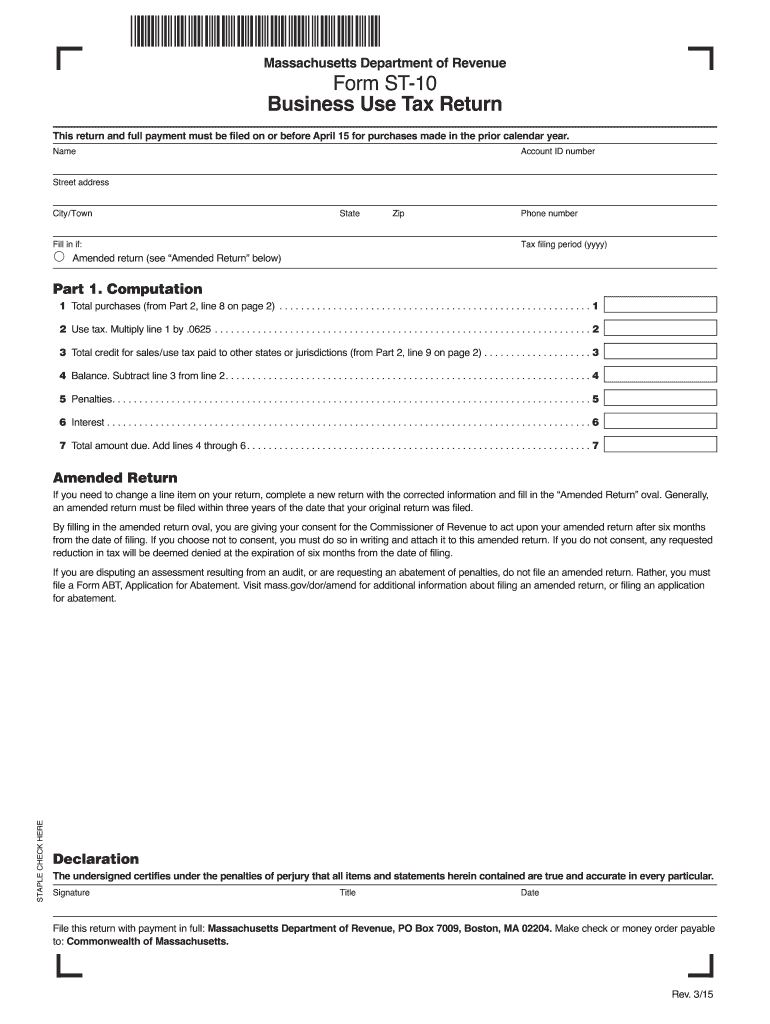
The Massachusetts Form ST-10 Business Use Tax Return is a tax document used by businesses in Massachusetts to report and pay use tax on prior year purchases.
pdfFiller scores top ratings on review platforms




Who needs MA ST-10?
Explore how professionals across industries use pdfFiller.

MA ST-10 is needed by:
-
Massachusetts business owners
-
Accountants handling business tax filings
-
Tax preparers assisting clients in MA
-
Businesses making taxable purchases
-
Compliance officers in tax departments
Comprehensive Guide to MA ST-10
What is the Massachusetts Form ST-10 Business Use Tax Return?
The Massachusetts Form ST-10 is an essential document for businesses in Massachusetts, serving as the Business Use Tax Return. It plays a critical role in tax reporting, ensuring that businesses comply with state tax laws. This form is significant because it mandates the reporting of specific purchases that require the payment of use tax.
Businesses must report purchases made for business use that were not taxed at the time of sale. Compliance with the Massachusetts Form ST-10 prevents potential penalties and fines associated with improper tax reporting, underscoring its importance in maintaining transparency in business transactions.
Purpose and Benefits of the Massachusetts Form ST-10 Business Use Tax Return
The primary purpose of the Massachusetts Form ST-10 is to fulfill tax obligations and facilitate smooth business operations. Businesses that file this form benefit from avoiding penalties associated with non-compliance with state tax laws.
By accurately reporting use tax, companies can safeguard themselves from costly fines. In addition, maintaining organized records enhances transparency in transactions, promoting good business practices and compliance with tax regulations.
Who Needs to File the Massachusetts Form ST-10 Business Use Tax Return?
The Massachusetts Form ST-10 must be filed by various types of businesses that are obligated to report use tax. Common business entities include corporations, partnerships, and sole proprietors who purchase items for business purposes.
However, certain exemptions exist, including scenarios where the purchases fall under specific tax-exempt categories. Understanding the eligibility criteria is crucial for businesses to ensure they meet their tax responsibilities without unnecessary filing.
When to Submit the Massachusetts Form ST-10 Business Use Tax Return
The filing deadline for the Massachusetts Form ST-10 is April 15, which applies annually to all businesses required to submit this form. Businesses should remain aware of any grace periods granted by the Massachusetts Department of Revenue.
Consequences of failing to file on time can include late fees and interest on unpaid taxes. Furthermore, situations requiring amendments to the form may arise if errors are identified after submission, emphasizing the necessity for timely and accurate filings.
Key Features of the Massachusetts Form ST-10 Business Use Tax Return
The Massachusetts Form ST-10 includes various key features that simplify the process of reporting use tax. Crucial sections of the form comprise fillable fields such as 'Buyer Information' and details pertaining to 'Purchases.'
Additionally, the form contains a computation section that aids in calculating the use tax owed accurately. Users will find instructions helpful for filling in mandatory information, ensuring compliance with state requirements and simplifying tax filing.
How to Fill Out the Massachusetts Form ST-10 Business Use Tax Return Online (Step-by-Step)
Filling out the Massachusetts Form ST-10 online is a straightforward process when following a step-by-step approach. Begin by accessing the form on pdfFiller's platform, where you can directly complete the fields.
-
Start by entering your Buyer Information, including the name and account ID number.
-
Provide a detailed list of purchases, including dates and prices.
-
Complete the computation section to determine the amount of use tax owed.
-
Review the filled form for accuracy before final submission.
Common mistakes to avoid include missing fields and incorrect calculations. Using online platforms like pdfFiller streamlines this process significantly.
Submission Options for the Massachusetts Form ST-10 Business Use Tax Return
Businesses have several options available for submitting the Massachusetts Form ST-10. The primary methods include electronic submission through approved platforms or mailing a physical copy of the form to the Massachusetts Department of Revenue.
If opting for the physical submission, businesses should ensure the form is printed clearly and all relevant details are included. Additionally, for support with the submission process, the Massachusetts Department of Revenue provides contact information readily accessible for inquiries.
Security and Compliance with the Massachusetts Form ST-10 Business Use Tax Return
When submitting the Massachusetts Form ST-10, businesses need to prioritize data security and compliance. Platforms like pdfFiller offer robust security features to protect user data during the submission process.
Compliance with regulations such as HIPAA and GDPR ensures that sensitive information is handled responsibly. Users should adopt best practices for safe document handling and submission to maintain the integrity of their data.
How pdfFiller Can Help with the Massachusetts Form ST-10 Business Use Tax Return
Utilizing pdfFiller for completing the Massachusetts Form ST-10 provides numerous advantages. The platform offers features such as electronic signing, customization of fields, and easy annotation capabilities, making the process user-friendly.
Businesses can save time and reduce stress while navigating tax requirements through pdfFiller's efficiency. Testimonials from users indicate significant benefits experienced through the platform, reinforcing its value to businesses across Massachusetts.
Take the Next Step in Filing Your Massachusetts Form ST-10 Business Use Tax Return
By using pdfFiller, businesses can enjoy a seamless process for completing the Massachusetts Form ST-10. The platform's intuitive interface enhances the user experience while ensuring compliance with tax obligations.
Now is the time to get started with filling out the form and leveraging the benefits of an online tool designed to simplify tax filing for businesses across Massachusetts.
How to fill out the MA ST-10
-
1.Start by accessing the Massachusetts Form ST-10 on pdfFiller's website by searching for 'Massachusetts Form ST-10 Business Use Tax Return.'
-
2.Once you're on pdfFiller, open the form and familiarize yourself with the layout and fillable fields.
-
3.Gather all necessary information before you begin, including details about your purchases from the prior year, such as dates, sellers, quantities, descriptions, and sales prices.
-
4.Begin filling in the required fields, entering your name, account ID number, street address, city/town, state, zip code, phone number, and tax filing period in the appropriate input sections.
-
5.Use pdfFiller's options to fill out the computation section where you calculate the use tax owed based on your provided purchase data.
-
6.After you have completed the form, review each entry for accuracy and ensure all required fields are filled in to avoid common mistakes.
-
7.If you need to make any amendments to the information provided, follow the directions within the form regarding amended returns.
-
8.Once you are satisfied with the completed form, save your work and then choose to download or submit it through pdfFiller’s tools, following the link to the Massachusetts Department of Revenue website for final submission.

Who is eligible to file the Massachusetts Form ST-10?
Any business operating in Massachusetts that has made taxable purchases in the prior calendar year is eligible to file the Form ST-10 Business Use Tax Return.
What is the submission deadline for the Form ST-10?
The completed Massachusetts Form ST-10 must be submitted to the Massachusetts Department of Revenue by April 15 of the year following the tax year being reported.
How can I submit the completed Form ST-10?
You can submit your completed Form ST-10 by filing it electronically through the Massachusetts Department of Revenue's website or by mailing the printed version to the appropriate address.
Are there any supporting documents required for the Form ST-10?
While the Form ST-10 itself does not require additional supporting documents, it’s advisable to keep records of all purchase receipts and relevant transaction details in case of an audit.
What are common mistakes to avoid when filling out the Form ST-10?
Common mistakes include failing to provide accurate purchase details, not calculating the use tax correctly, and omitting mandatory fields. Always double-check your entries.
How long does it take to process the Form ST-10?
Processing times for the Form ST-10 can vary, but typically allow a few weeks for the Massachusetts Department of Revenue to review and process your submission.
Is notarization required for the Massachusetts Form ST-10?
No, the Massachusetts Form ST-10 does not require notarization before submission.
MA ST-10 Form Versions
Related Content
Related Forms




Get the latest insights from our blog


If you believe that this page should be taken down, please follow our DMCA take down process
here
.
This form may include fields for payment information. Data entered in these fields is not covered by PCI DSS compliance.